
Custom Datasets — Clone Your Brand Style
Upload 1–6 reference thumbnails that represent your visual identity, and ThumbAPI clones that style at 80–100% fidelity for every future generation. Every thumbnail looks like it belongs to the same brand, the same channel, the same product line — even when you scale to hundreds of videos a month.
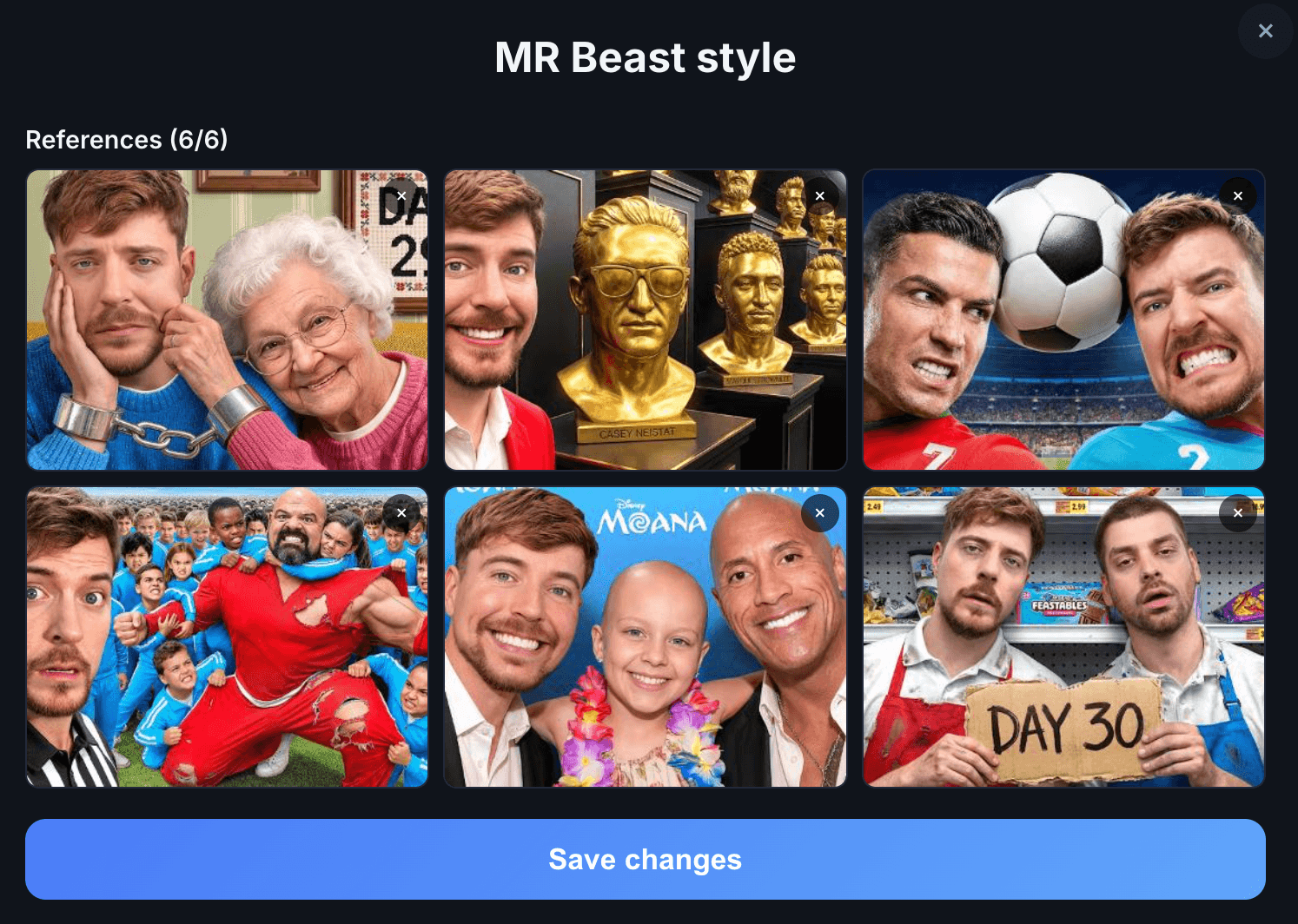
Studio's reference-set editor with a saved "MR Beast style" dataset of six coherent thumbnails. Pass this set's ID as customAssetsId and every future generation clones that style.
The Problem Custom Datasets Solve
Brands care about consistency. A YouTube channel with 500 videos should have 500 thumbnails that look like they came from the same designer. Same colors, same typography weight, same composition instincts, same mood.
The default AI generation path — Smart References — is great when you want to follow current niche patterns. But it prioritizes what converts in your niche right now, not what your brand specifically looks like. Custom Datasets flip that. You upload your style, the AI clones it, and every generation stays inside your visual guardrails.
How It Works
Upload a reference set in the ThumbAPI dashboard — 1 to 6 images that together define your style. Save it. You get back a customAssetsId. Pass that ID in every generation request and the AI will clone the style at 80–100% fidelity.
curl -X POST https://api.thumbapi.dev/v1/generate \
  -H "x-api-key: YOUR_API_KEY" \
  -H "Content-Type: application/json" \
  -d '{
    "title": "10 crypto scams to avoid in 2026",
    "customAssetsId": "asset_9f3b2c1a"
  }'
The format parameter is optional here
When you upload a reference set, you pick its target format (YouTube, Instagram, LinkedIn, X, or blog post). That format is stored with the set. When you send customAssetsId, you do not need to send format — the set's stored format wins. If you send format anyway, it is ignored.
What Makes a Good Reference Set
- Consistent style — all 6 images should feel like they belong together. Same color palette, same typography weight, same composition tendency. Mixing wildly different styles dilutes the clone.
- Real published work — thumbnails that have actually run on your channel or product beat mockups. The AI picks up on production texture (compression, real lighting, real edges).
- Cover the range you want — if you want the clone to handle both list videos and single-topic videos, include examples of both. If your brand is monolithic (always the same composition), 1 or 2 references is enough.
- Match the target format — a YouTube reference set should be 16:9 thumbnails. An Instagram set should be 1:1. Do not mix aspect ratios in the same set.
Custom Datasets vs. Smart References
These are the two ways ThumbAPI decides what your thumbnail should look like. They are alternatives, not layers — each generation uses one or the other.
- Smart References (default) — auto-discovered from a live-updated library of high-performing thumbnails in your platform and niche.
- Custom Datasets (this page) — cloned from your own uploaded reference set at 80–100% fidelity.
Which to use depends on what you optimize for. If you want what converts right now in my niche, use Smart References. If you want what my brand looks like, always, use Custom Datasets.
Who This Is For
Established Channels
A channel with 100+ videos already has a visual identity. Uploading 6 of your best-performing thumbnails as a Custom Dataset means every new video's thumbnail extends that identity instead of drifting.
Agencies With Multiple Clients
Save one reference set per client. Pass the right customAssetsId per request. No prompt engineering, no style tuning per client, no manual per-client design work.
Product & SaaS Brands
If your marketing team has a locked-down design system — specific fonts, specific colors, specific composition rules — a reference set of 6 hero images plus the customAssetsId keeps every blog cover and social share inside the design system without a designer in the loop.
Faceless YouTube Automation at Scale
Faceless channels running 3+ uploads per day cannot afford visual drift — inconsistent thumbnails signal a spam channel to viewers and to the algorithm. A Custom Dataset locks the look in.
Pricing
customAssetsId is a +2 credit add-on per generation. So a 1K generation with a Custom Dataset costs 12 credits (10 base + 2 add-on). Combining with usePhoto and useLogo adds +2 each. Full breakdown on the generate endpoint documentation.
Lock in your brand style once. Generate consistent thumbnails forever.
Try ThumbAPI free — 50 credits per month, no credit card. Upload your reference set from the dashboard.
Related Pages
The default behavior — auto-discover proven thumbnail patterns from a live library. Alternative to Custom Datasets.
AI Thumbnail GenerationWhy ThumbAPI generates fresh images every time instead of filling templates.
Generate Endpoint DocumentationFull API reference for customAssetsId, all other parameters, and every category value.
Branded Thumbnails (useLogo)Combine Custom Datasets with automatic logo overlay for full brand lock-in.
ThumbAPI vs BannerbearHow AI-cloned styles compare to Bannerbear's template variable approach.
Custom Assets DocumentationTechnical guide for uploading and managing custom reference sets in the dashboard.