
ThumbAPI for WordPress: Auto Featured Images From Any Post Title
Generate a production-ready featured image with one click, directly inside the WordPress post editor. No design tools, no manual upload, no external workflow. The official ThumbAPI plugin for WordPress turns your post title into a 1200×630 cover image and sets it as the post's Featured Image automatically. For the wider look at the WordPress blog thumbnail API surface — the code-based must-use-plugin route, pricing per post volume, and how it plays with block and classic editors — see the dedicated landing page.
Get the plugin
The plugin is live on the official WordPress.org Plugin Directory. Install it from your WordPress admin by searching for ThumbAPI, or grab it from the link below.
One-click install from WordPress admin: Plugins → Add New → search “ThumbAPI”.
What the plugin does
The plugin adds a small “ThumbAPI” panel to the post editor sidebar (Gutenberg block editor) and below the Featured Image meta box (classic editor). One click generates and sets the featured image — the post title is used as the prompt.
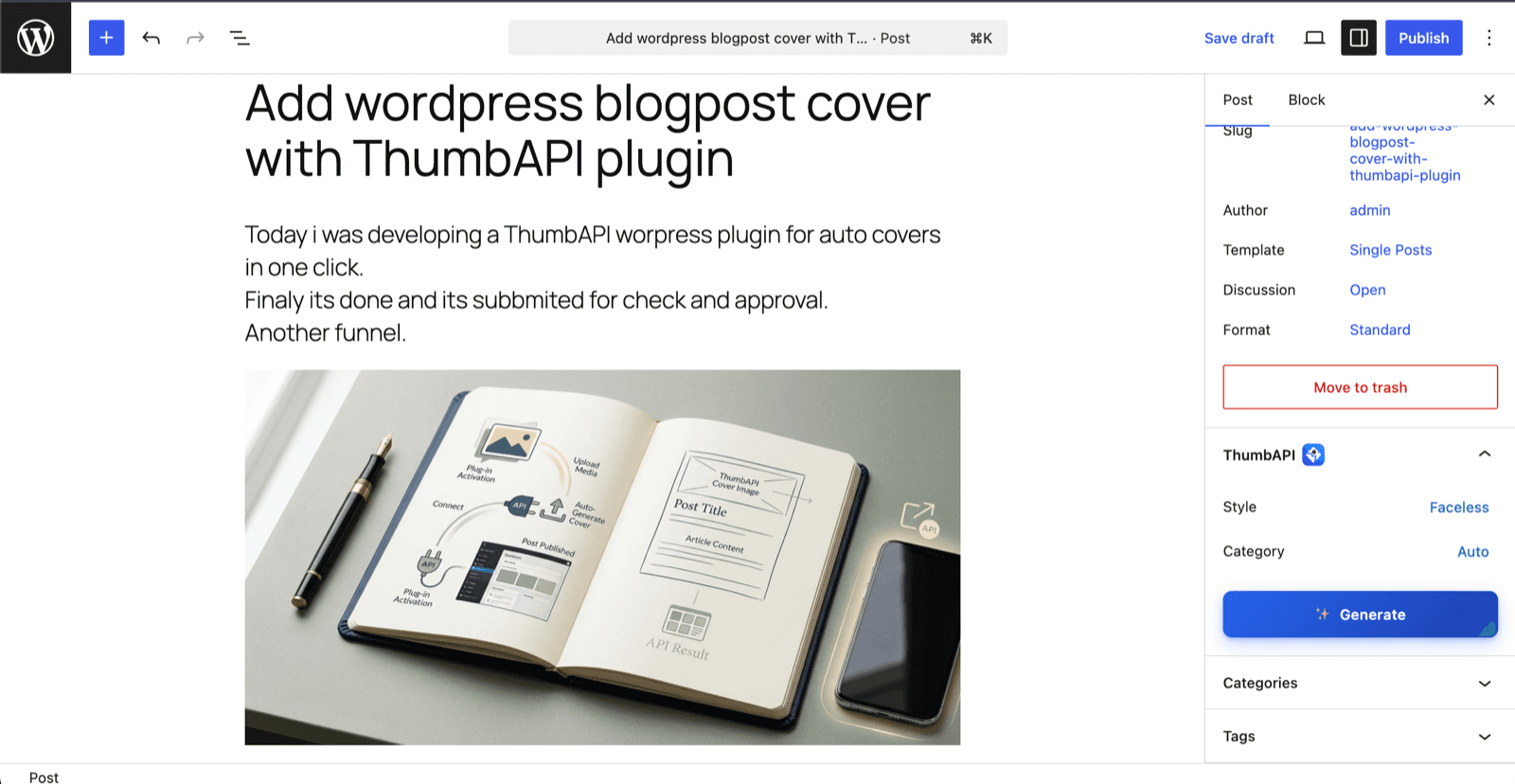
- One-click featured image generation from the post title
- Block editor sidebar panel and classic editor meta-box support
- Image styles: Faceless (text + graphics), With image, or With logo
- 13 content categories (Tech & SaaS, Business, Travel, Food, Gaming…)
- Pick image source from WordPress Media Library or reuse the personal photo / logo saved in your ThumbAPI dashboard
- 1200×630 output — optimized for blog hero, OG image, and social previews
- Generated images go through the standard WordPress Media Library — all thumbnail sizes generated automatically
Install the plugin
Install directly from your WordPress admin in under a minute:
1. WordPress admin → Plugins → Add New Plugin.
2. Search for "ThumbAPI".
3. Click Install Now → Activate.
4. Settings → ThumbAPI → paste your API key → Save Changes.
5. Open any post → ThumbAPI panel in the sidebar → Generate.
You need a free ThumbAPI account — enough to verify the plugin works on your site before upgrading.
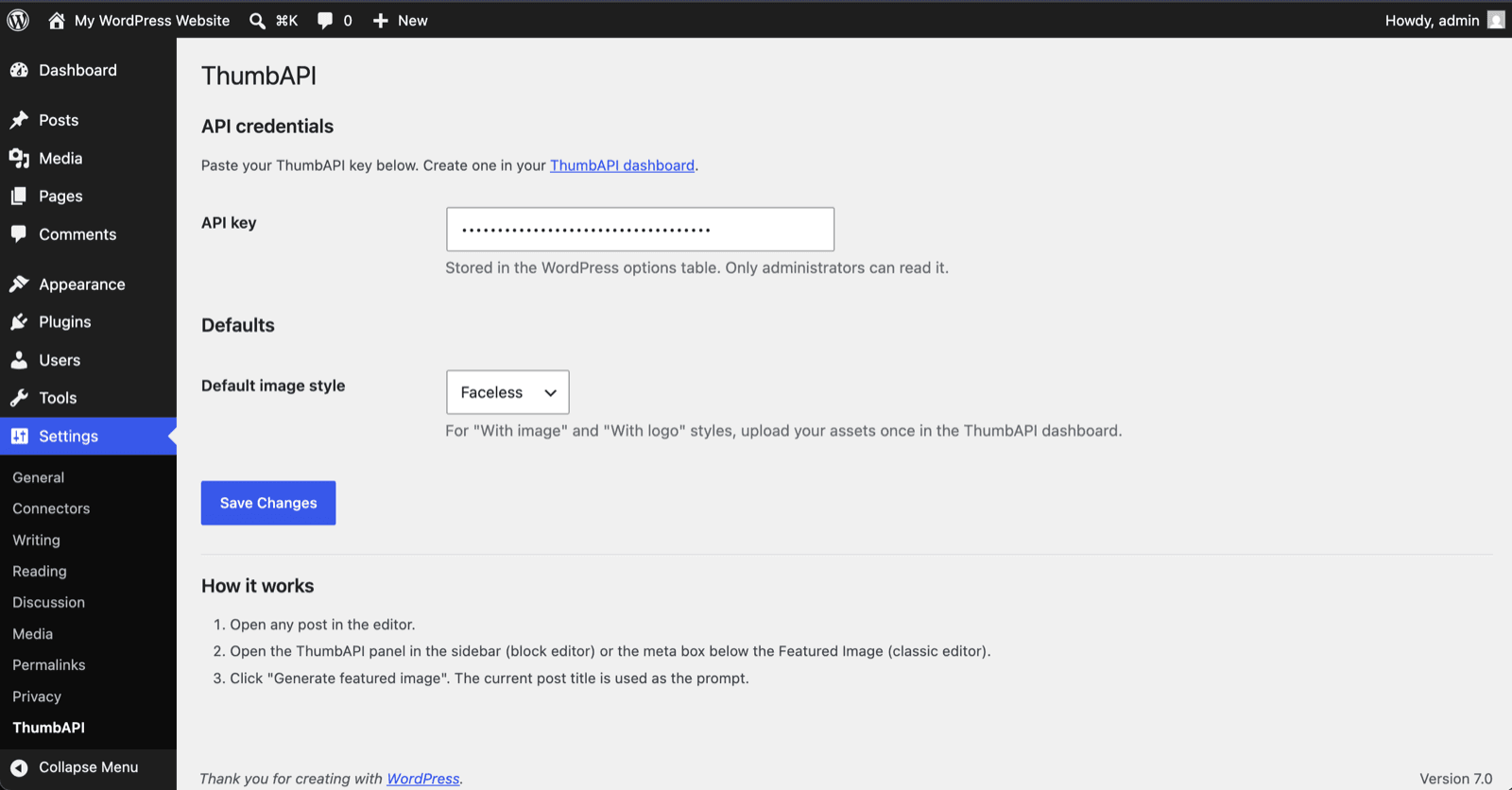
How to use it
1. Write your post title (e.g. "10 Tips to Grow a SaaS Blog").
2. Save the draft.
3. Open the ThumbAPI panel in the editor sidebar.
4. Pick a Style: Faceless, With image, or With logo.
5. Pick a Category: Tech & SaaS, Travel, Food, etc. (or leave on Auto).
6. Click Generate.
7. A 1200×630 cover image is generated, uploaded to the
   Media Library, and set as the post's Featured Image.
The whole flow takes under five seconds in the editor. No template configuration, no separate dashboard, no copy-paste from external tools.
Using a personal photo or logo
For the With image and With logo styles, the plugin gives you two choices:
- Media Library — pick any image already in your WordPress Media Library. Sent inline to ThumbAPI, max 2 MB. Useful for per-post creator photos or post-specific brand assets.
- ThumbAPI dashboard — reuse the personal photo or logo you uploaded once in your dashboard. Ideal for consistent branding across every post without re-picking each time.
What data is sent to ThumbAPI
Only when you click Generate, the plugin sends:
- The post title (string)
- The selected image style and category
- The Media Library image you picked (only if you chose “Media Library” as the source)
- Your API key as
x-api-keyheader
Nothing is sent automatically. No tracking, no telemetry, no unsolicited requests. See the ThumbAPI privacy policy and terms of service for full details.
Requirements
- WordPress 6.2 or newer
- PHP 7.4 or newer
- A free or paid ThumbAPI account for the API key
Common questions
Is the plugin free?
The plugin itself is free and open source under GPL-2.0-or-later. It uses your ThumbAPI account to generate images. The free ThumbAPI plan includes 50 credits per month — enough to validate the plugin works on your site.
Does it work with the classic editor?
Yes. The plugin adds a small section below the standard Featured Image meta box in the classic editor, with the same generate button and image source picker as the block editor sidebar.
Will my existing featured images be replaced?
Clicking Generate always sets the new image as the featured image. Your previous featured image stays in the Media Library and can be reassigned manually if needed.
Where is the WordPress.org listing?
The plugin is published at wordpress.org/plugins/thumbapi. Inside your WordPress admin, search for ThumbAPI under Plugins → Add New to install with one click — updates then flow through the standard WordPress plugin updater.
Where can I report bugs?
Email support@thumbapi.dev with the WordPress version, PHP version, and any error message you see in the editor or browser console.
Set Featured Image Programmatically (For Developers)
If you already have a custom publishing pipeline — a headless CMS, a Gutenberg block that pulls in external content, or a scheduledwp_insert_post job — you can skip the plugin and set the featured image directly from a ThumbAPI-generated URL. The API returns animageUrl on a Cloudflare R2 CDN, so WordPress can sideload it straight into the Media Library and attach it as the featured image in one function call.
<?php
/**
 * Auto-generate a ThumbAPI featured image whenever a post
 * is published without one. Drop this in your theme's
 * functions.php or a small mu-plugin.
 */
add_action( 'save_post', function ( $post_id, $post ) {
    if ( 'post' !== $post->post_type ) return;
    if ( has_post_thumbnail( $post_id ) ) return;
    if ( wp_is_post_revision( $post_id ) ) return;

    $response = wp_remote_post( 'https://api.thumbapi.dev/v1/generate', array(
        'timeout' => 60,
        'headers' => array(
            'x-api-key'    => THUMBAPI_KEY,          // define() elsewhere
            'Content-Type' => 'application/json',
        ),
        'body' => wp_json_encode( array(
            'title'  => get_the_title( $post_id ),
            'format' => 'blogpost',                  // 1200x630 cover
        ) ),
    ) );

    if ( is_wp_error( $response ) ) return;

    $body     = json_decode( wp_remote_retrieve_body( $response ), true );
    $imageUrl = $body['imageUrl'] ?? null;
    if ( ! $imageUrl ) return;

    // Sideload the CDN URL into the Media Library and attach it.
    require_once ABSPATH . 'wp-admin/includes/media.php';
    require_once ABSPATH . 'wp-admin/includes/file.php';
    require_once ABSPATH . 'wp-admin/includes/image.php';

    $attachment_id = media_sideload_image( $imageUrl, $post_id, null, 'id' );
    if ( ! is_wp_error( $attachment_id ) ) {
        set_post_thumbnail( $post_id, $attachment_id );
    }
}, 10, 2 );
This hook fires on save_post, checks that the post has no featured image, and only then calls the API — so it doubles as a fallback for posts that were published without one. If you want to force-refresh existing posts, remove the has_post_thumbnail guard.
Get your ThumbAPI key
Sign up for a free ThumbAPI account, grab your API key, and install the plugin.
Related Pages
The full Thumbnail API — endpoints, formats, code samples, and pricing in one place.
Blog Cover APIHow to generate blog cover images via the ThumbAPI REST endpoint.
OG Image APIGenerate 1200×630 Open Graph images for social previews.
Zapier IntegrationAuto-generate thumbnails from any Zapier trigger with the Webhooks action.
Make.com IntegrationConnect ThumbAPI to Make.com for visual automation workflows.
n8n IntegrationPlug-and-play HTTP Request node setup with a copy/paste workflow.