
Thumbnail API — Generate Thumbnails From Any Title
ThumbAPI is a thumbnail API for developers. Send a title, pick a format, get a production-ready image back in under 25 seconds. One REST endpoint covers YouTube thumbnails, Open Graph images, blog covers, and social media images — no templates to maintain, no design tool to open, no manual work.
Every modern app needs thumbnails. The bottleneck is producing them at the rate content is published. ThumbAPI replaces that work with a single HTTP POST. The pipeline is deterministic per request: the layout is selected from the format parameter and a set of title heuristics, the title is fit to the canvas, the image is rendered, and base64 is returned in the same response — no template engine, no headless browser, no design queue on your side.
- YouTube channels automating thumbnails per upload
- SaaS and blogs auto-generating OG images per page
- Social tools producing post images at scale
- Agencies generating branded thumbnails for client channels
- Newsletters and publications creating hero images on publish
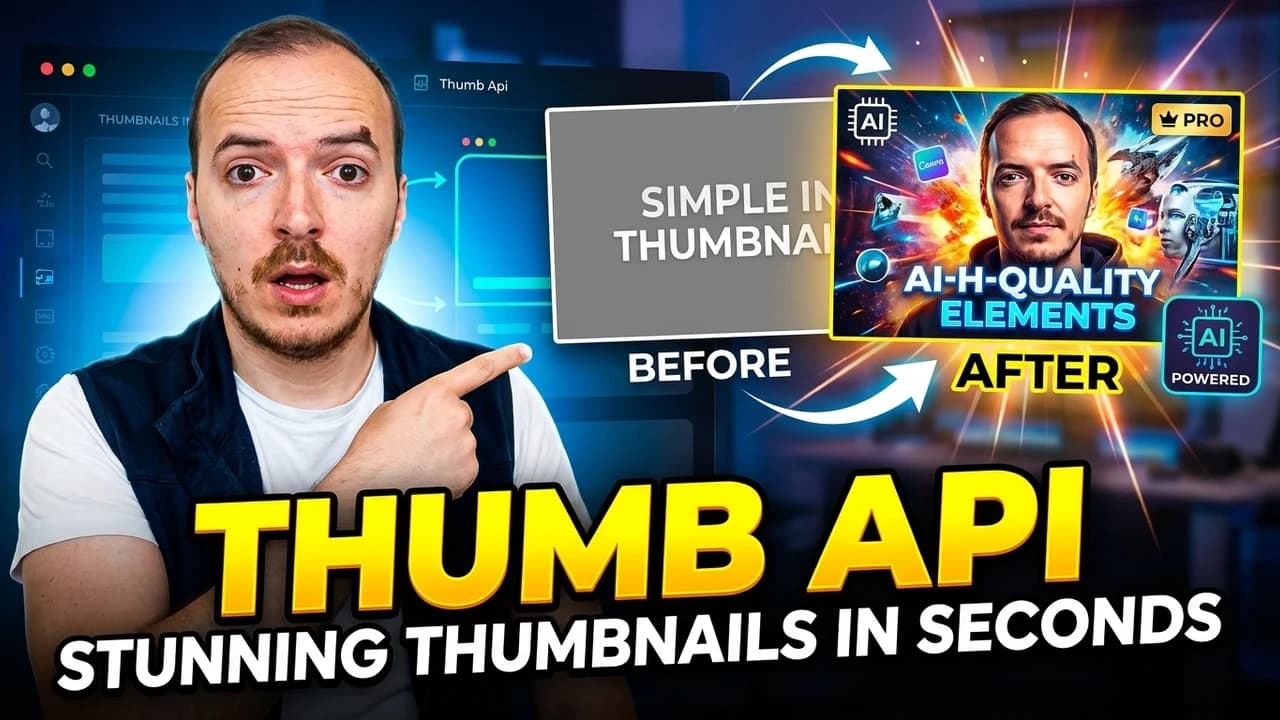


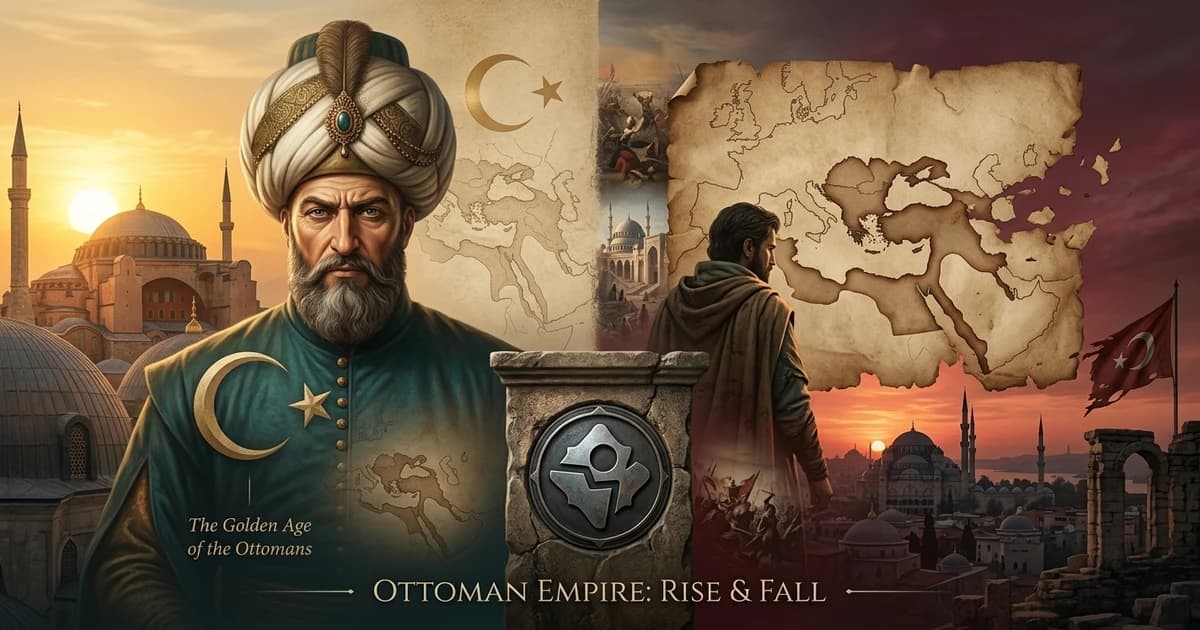
Real outputs — YouTube thumbnails (1280×720) and blog covers / OG images (1200×630) generated by ThumbAPI
Quick start
curl -X POST https://api.thumbapi.dev/v1/generate \
  -H "x-api-key: YOUR_API_KEY" \
  -H "Content-Type: application/json" \
  -d '{
    "title": "How to Ship Faster",
    "format": "youtube"
  }'
Thumbnail Generator API — One REST Endpoint, Any Platform
ThumbAPI is a thumbnail generator API — a single REST endpoint that turns a title string into a production-ready image for the platform you name. Instead of stitching together a design tool, an upload script, and a CDN, you POST once to api.thumbapi.dev/v1/generate, name the target format (youtube, blogpost, instagram, x, linkedin), and get back a WebP or PNG plus a Cloudflare R2 CDN URL. No SDK lock-in, no template design, no browser automation — programmatic thumbnail generation the way a REST-first backend would build it.
Free Thumbnail API — No Watermark, No Login for Public Tests
The free tier ships 50 credits per month at signup with no credit card. Generated images have no watermark, no logo overlay, and no forced attribution — they are your assets to publish, embed, or resell. If you want to sanity-check the API before signing up, the public test key documented in /docs/quickstart lets you run a live curl against /v1/generate without an account. That is what most automation platform maintainers (n8n community node, Make.com template, MCP server users) use for their first request.
Request Schema
Minimum request: title + format. Everything else is an optional flag for style, niche, brand assets, or render quality. Full field reference lives at /docs/endpoints/generate.
{
  "title":           "string   (required, max 200 chars)",
  "format":          "youtube | blogpost | instagram | x | linkedin  (required*)",
  "category":        "auto | tech-saas | business-finance | ...   (13 niches, default: auto)",
  "usePhoto":        "boolean  (default: false)  — use saved Personal Photo",
  "useLogo":         "boolean  (default: false)  — overlay saved Logo",
  "photoImage":      "string   (optional)        — inline base64 photo, max 2MB",
  "logoImage":       "string   (optional)        — inline base64 logo,  max 1MB",
  "customAssetsId":  "string   (optional)        — saved reference set ID",
  "model":           "sd | hd  (default: sd)     — hd is Pro+ only",
  "outputFormat":    "webp | png  (default: webp)"
}

// *format is optional when customAssetsId is provided — the saved set carries it.
Response Example
Successful generations return 200 OK with the rendered image inline as a base64 data URI — no second request, no polling:
{
  "image":        "data:image/webp;base64,UklGRp4HAA...",
  "format":       "youtube",
  "outputFormat": "webp",
  "generationId": "jrIgKpc5KaHkMKBiCPNl",
  "imageUrl":     "https://cdn.thumbapi.dev/users/<uid>/generations/jrIgKpc5KaHkMKBiCPNl.webp"
}
Typical end-to-end latency is 15–25 seconds. Remaining quota is exposed on the response headers (see Rate Limits below) so batch jobs can self-throttle without an extra usage call.
Status Codes
Standard HTTP status codes. 2xx is a successful generation; 4xx is a client error you can fix and retry; 5xx is a transient server-side issue and is safe to retry with exponential backoff.
| Status | Cause |
|---|---|
200 | Image generated and returned in the response body. |
400 | Missing or invalid title / format / category, asset toggle without a saved asset, or inline image over the size cap. |
401 | Missing or invalid x-api-key. |
403 | Plan does not include the requested feature — e.g. hd model, saved photos/logos, or custom reference sets require Pro+. |
404 | customAssetsId does not exist on this account. |
429 | Per-second rate limit exceeded, or monthly generation limit reached. |
500 | Internal failure during render — retry with exponential backoff. |
Full message-level reference is in /docs/errors.
Error Response Example
All errors share the same envelope — a single error string with the human-readable cause:
{
  "error": "format must be one of: youtube, instagram, x, blogpost, linkedin"
}
Rate Limits
Two limits apply per API key: a per-second rate limit (1/2/5/20 req/s by plan) and a monthly generation quota (in credits — 50 / 750 / 2,500 / 10,000 by plan). Every response echoes the monthly quota state so a batch job can throttle itself:
| Header | Meaning |
|---|---|
X-RateLimit-Limit | Total generations allowed this billing period. |
X-RateLimit-Remaining | Generations remaining this billing period. |
X-RateLimit-Reset | ISO 8601 timestamp when the quota resets. |
For batch jobs, the recommended pattern is exponential backoff on 429 and 5xx, with concurrency tuned so X-RateLimit-Remaining never drops below a safe margin. Current quotas per plan and a retry-loop snippet are in /docs/rate-limits.
What You Can Generate
One endpoint, five formats. Switch by passing the format parameter. Each format has a dedicated landing page with code examples and deeper docs:
| Format | Size | Best For | Guide |
|---|---|---|---|
youtube | 1280×720 | YouTube video thumbnails — faceless, personalized, branded | YouTube Thumbnail API |
blogpost | 1200×630 | Open Graph cards, Twitter/LinkedIn previews, blog hero images, newsletter headers — the universal social/blog size | OG Image API · Blog Cover API |
instagram | 1024×1024 | Square Instagram post images and feed graphics | Instagram Post Image API |
x | 1200×675 | X (Twitter) in-post images, 16:9 native ratio | X (Twitter) Image API · Twitter thumbnail API |
linkedin | 1200×627 | LinkedIn post images and article hero banners | LinkedIn Post Image API |
How It Works
Three steps. No SDK, no queue, no polling. The image is returned in the same HTTP response.
- POST your title and format to
https://api.thumbapi.dev/v1/generate. Optionally include a category (13 niches), a saved logo, or a saved photo. - The AI designs and renders the image — composition, typography, color palette, and layout are picked to match the title and format.
- Receive the image as a base64 string in the JSON response. Save it to disk, push to S3, or pipe it straight to YouTube or your CMS.
Most generations finish in 15–25 seconds. There's no separate create job → poll status → downloadflow — it's a single request/response.
Thumbnail API vs the Alternatives
Most teams reach for a design tool, a template engine, or a raw image model when they need thumbnails at scale. Here's how those approaches actually compare for an automated workflow:
| Approach | Time per thumbnail | Templates required | Scales by API |
|---|---|---|---|
| Manual design (Canva, Figma, Photoshop) | 15–45 minutes | No (you design from scratch) | No |
| Template-based image API (Bannerbear, Templated) | 5–10 sec per render, but hours of template work upfront | Yes — you maintain templates per layout | Yes |
| Raw generative models (DALL·E, SDXL, Midjourney API) | 10–60 sec, plus heavy post-processing for text | No, but prompts and layout are your problem | Yes |
| ThumbAPI (this API) | Under 25 sec end-to-end | No — layout is selected from format + title heuristics per request | Yes |
Deeper comparisons: ThumbAPI vs Canva, vs Bannerbear, vs Orshot, and vs raw AI image models.
Code Examples
Same endpoint, your language of choice. Pick a starter:
Node.js
import { writeFileSync } from "node:fs";

const res = await fetch("https://api.thumbapi.dev/v1/generate", {
  method: "POST",
  headers: {
    "x-api-key": process.env.THUMBAPI_KEY,
    "Content-Type": "application/json",
  },
  body: JSON.stringify({
    title: "10 Tips to Grow Your YouTube Channel",
    format: "youtube",
  }),
});

const { image } = await res.json();
const base64 = image.replace(/^data:image\/\w+;base64,/, "");
writeFileSync("thumb.webp", Buffer.from(base64, "base64"));
Python
import base64, os, requests

res = requests.post(
    "https://api.thumbapi.dev/v1/generate",
    headers={"x-api-key": os.environ["THUMBAPI_KEY"]},
    json={"title": "Ship Faster Without Breaking Things", "format": "blogpost"},
    timeout=60,
)

data_uri = res.json()["image"]
binary = base64.b64decode(data_uri.split(",", 1)[1])
open("cover.webp", "wb").write(binary)
Full reference, error codes, and rate limits live in the API documentation. More working examples — including batch generation, webhooks, and custom assets — are in /docs/examples and on GitHub.
Built for Automation
ThumbAPI is a thin REST API — anything that can make an HTTP request can call it. That includes every major workflow tool, every headless CMS, and every CI runner. Below are the most common automation targets, each with a dedicated guide.
No-Code Workflow Automation
- n8n thumbnail automation — self-hosted workflows that trigger generation from any node. See the n8n thumbnail workflow walkthrough and the auto-generate YouTube thumbnails with n8n tutorial.
- Zapier — connect ThumbAPI to 6,000+ apps via Webhooks by Zapier. Trigger on new RSS items, Airtable rows, Notion entries, Google Sheets rows, or any Zapier trigger. Same pattern bridges Webflow CMS Collections, since Webflow exposes its CMS through Zapier triggers.
- Make.com (Integromat) — visual scenarios with the HTTP module. Good fit for branching logic, retries, and aggregating multiple thumbnails per workflow.
CMS Hooks & Headless CMS
- WordPress — drop-in plugin / hook into
save_postorpublish_postto generate a featured image on publish. Works with both classic editor and Gutenberg. - Headless CMS (Ghost, Sanity, Contentful, Strapi) — any CMS that fires a webhook on publish can trigger ThumbAPI. The pattern: webhook → serverless function → POST to
/v1/generate→ upload the returned image back to the CMS as the cover. The automating content creation guide walks through the full webhook → ThumbAPI → CMS-update loop with working code. - Webflow— Webflow CMS items don't fire native webhooks for ThumbAPI, but the standard bridge is Zapier or Make: trigger on a new/updated CMS Collection item, generate via ThumbAPI, write the image URL back to the Webflow item field.
- Static-site / SSG — Next.js, Astro, Hugo, Eleventy: generate thumbnails at build time inside your build script and commit (or upload) the WebPs alongside the post. The OG Image API guide covers build-time-vs-runtime trade-offs.
Code-Driven Pipelines
- Node.js / TypeScript — see the Node.js thumbnail generation guide for streaming, retries, and saving output to disk or S3.
- Python — see the Python thumbnail API tutorial and the batch generation pattern in Python for high-volume jobs.
- Batch / cron jobs — loop through a content calendar, generate every thumbnail in one run, save outputs to a CDN. Combine with
X-RateLimit-Remainingfor safe parallelism. - YouTube publishing pipeline— generate the thumbnail and upload directly via YouTube Data API's
thumbnails.seton publish. Full walkthrough in generate YouTube thumbnails automatically. - Brand consistency at scale — save a logo and personal photo once with custom assets, or define a 1–6 image reference set for full style cloning, then pass flags to reuse them across thousands of generations.
Pricing
Pricing is metered in credits. A standard 1K thumbnail costs 10 credits; add-ons (saved photo, saved logo, custom reference set) add +2 each; a 2K (hd) render costs 20 credits instead of 10. Unused credits don't roll over.
| Plan | Credits / month | Price |
|---|---|---|
| Free | 50 | $0 |
| Creator | 750 | $19/month |
| Pro | 2,500 | $49/month |
| Business | 10,000 | $199/month |
All plans include every format and style. Free-tier output carries a small ThumbAPI watermark — paid plans (Creator and up) return watermark-free images. See full pricing details.
FAQ
What is a thumbnail API?
A thumbnail API is a REST endpoint that returns a ready-to-use image from structured input. With ThumbAPI you POST a title and a format, and the response includes a base64-encoded WebP or PNG. No design tool, no template, no rendering server on your side.
How do I generate a thumbnail with an API?
Send a POST to api.thumbapi.dev/v1/generate with your API key in the x-api-key header and a JSON body with at least title and format. Optional fields cover category, logo, photo, and style overrides. See the endpoint reference for the full schema.
Is there a free thumbnail API?
Yes — ThumbAPI's free tier gives you 50 credits per month with no credit card required. A standard 1K thumbnail costs 10 credits, so the free tier is enough to test the real endpoint end-to-end. Free-tier output carries a small ThumbAPI watermark; paid plans start at $19/month for 750 credits and return watermark-free images.
What output formats does the API return?
WebP by default, PNG optional. Both are production-ready and supported by every browser, social platform, and CDN.
Can I use this from any language?
Yes. ThumbAPI is a REST API with no required SDK. Any language with an HTTP client works — Node.js, Python, Go, Ruby, PHP, Java, .NET, Bash.
How does ThumbAPI compare to Canva or Bannerbear?
Canva is a manual editor and is the wrong tool for automation. Bannerbear renders user-built templates and scales well, but you maintain a template per layout. ThumbAPI generates the design from the title each time, so there's nothing to maintain. Detailed pages: vs Canva, vs Bannerbear.
Start Building
Three entry points depending on what you're generating. Each links to a format-specific guide with full code, parameters, and examples.
YouTube Thumbnail API →
1280×720 — faceless, personalized, or branded video thumbnails.
OG Image API →
1200×630 — Open Graph cards for Twitter, LinkedIn, Slack, Discord.
Blog Cover API →
Hero images for blog posts, newsletters, and article pages.
Prefer to read the spec first? Jump to the full endpoint reference, the quickstart, or grab a working sample from the examples repo on GitHub.
Start generating thumbnails via API — free tier, no credit card
Try It for FreeFormat-specific guides
1280×720 video thumbnails — faceless, personalized, or branded.
OG Image API1200×630 Open Graph cards for Twitter, LinkedIn, Slack, Discord.
Blog Cover APIHero images for blog posts, newsletters, and article pages.
Instagram Post Image API1024×1024 square images for Instagram feed and grid.
X (Twitter) Image API1200×675 in-post images for X (Twitter) — 16:9.
LinkedIn Post Image API1200×627 in-feed post images and LinkedIn Article banners.
API DocumentationEndpoint reference, authentication, errors, rate limits, SDKs.
Code examples on GitHubNode, Python, batch jobs, webhooks, and more.